Tutorial — Multiplayer
Goal: projectiles that every player sees, fired with no input latency, with server-authoritative damage, tested in a two-player Play-In-Editor session.
How replication works
No projectile state is ever replicated. Instead:
- A shot is expressed as a fire event (origin, direction, count, spread, speed, seed, type), about 40 bytes, quantized at encode time.
- The server spawns from that event and appends it to a replicated ring buffer (
AProjectileNetSync, created automatically), while also multicasting it for the current net update. - Every client runs the identical, seeded simulation locally, fast-forwarded by the event's age to cover latency.
- Only the server raises On Projectile Hit, so damage stays authoritative.
One event can carry up to 65,535 projectiles for their whole lifetime, so a 20,000-round volley costs the network about the same as a single rifle shot.
Late joiners receive the buffered events from the last Net Fire Event Lifetime seconds and catch up still-flying rounds.
Step 1 — List your types
Project Settings → Plugins → Mass Projectile Subsystem → Networking → Replicated Types: add every type a client may fire. The index in this array is what goes over the wire.
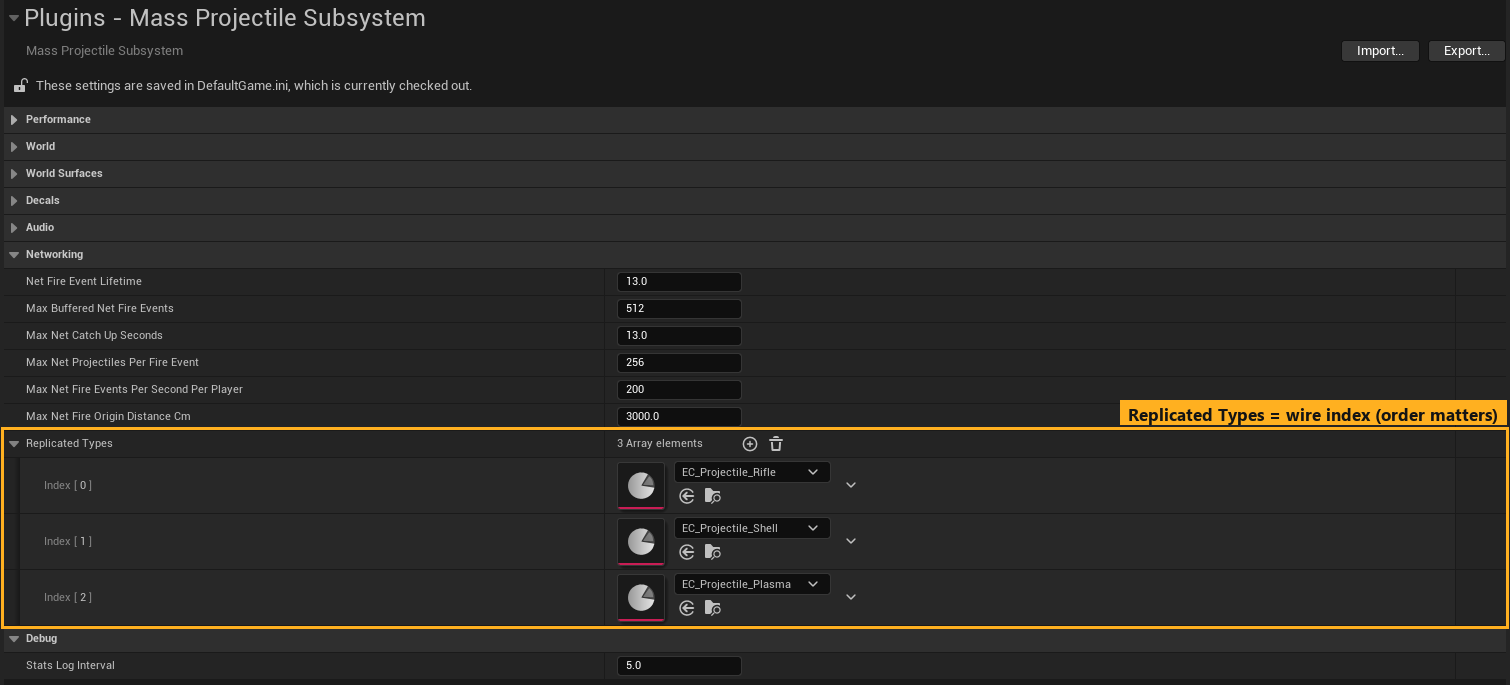
Keep Net Fire Event Lifetime and Max Net Catch Up Seconds at or above your longest Max Lifetime (default 6 s; settings default 13 s).
Step 2 — Fire through a replicated owner
Put Mass Projectile Fire on the replicated pawn/character (not on a weapon actor that might not be replicated or owned). See Tutorial 8.
In the weapon or input logic, call Fire / Fire From only on the locally controlled copy:
Fire Bullet
  └─ Branch: Is Locally Controlled (Pawn Owner)
       True → Mass Projectile Fire → Fire From (Origin, Direction)
Cosmetics that should play for everyone (muzzle flash, firing montage, recoil on remote players) are separate from the projectiles. Replicate them with your usual multicast or RepNotify.
Step 3 — AI and server-side weapons
AI runs on the server. Call Fire From on the AI pawn's component, or Spawn Projectiles directly. The server spawns and replicates automatically; no RPC is involved.
Step 4 — Damage
Use the Mass Projectile Hit component on the Game Mode (Tutorial 9). The Game Mode exists only on the server, which is exactly where hits are raised. Replicate health to clients with a RepNotify variable on the character, and update UI and death from the OnRep function.
Step 5 — Test with two players
- Play dropdown → Number of Players: 2, Net Mode: Play As Listen Server (or Play As Client for a dedicated server).
- Press Play. Fire from each window: the other window sees the tracers, impacts and decals.
- Shoot the other player and check that their health drops on both windows.
Useful while testing:
| Command | Purpose |
|---|---|
proj.Stats |
Active projectiles, traces and hits on this machine |
proj.DebugHits 1 |
On-screen line per impact (server shows the authoritative hits) |
Net PktLag=150 |
Add 150 ms latency to see client prediction at work |
proj.Clear |
On the server: clears all projectiles on every machine |
Network settings recap
| Setting | Default | Guidance |
|---|---|---|
| Net Fire Event Lifetime | 13 s | ≥ longest projectile lifetime (late join horizon) |
| Max Buffered Net Fire Events | 512 | Raise for many simultaneous shooters |
| Max Net Catch Up Seconds | 13 s | ≥ longest lifetime |
| Max Net Projectiles Per Fire Event | 256 | ≥ pellets × max rounds per frame. Violations disconnect the client. |
| Max Net Fire Events Per Second Per Player | 200 | Rate limit; excess is dropped |
| Max Net Fire Origin Distance Cm | 3000 | Anti teleport-fire; 0 disables |
Dedicated servers
Mass processors run on dedicated servers so hits and damage work, but no visualizer, decals or audio are created there (the Niagara visualizer is never instantiated). Listen servers render normally for the host.
Common pitfalls
- Physics props move differently on each machine: props without Replicates and Replicate Movement are simulated separately on every machine, and each one pushes its own copy. Turn both on (for a Static Mesh Actor: Static Mesh Replicate Movement) when every player must see the prop end up in the same place.
- Client shots are invisible to others: the client called Spawn Projectiles directly. Use the Fire component.
- Client shots do nothing at all: the type is not in Replicated Types.
- Double shots on the owner: you call Fire on every machine. Gate it with Is Locally Controlled.
- Client disconnects while firing a shotgun: Pellets × rounds exceeds Max Net Projectiles Per Fire Event.