Physical Surfaces
Whether a round stops, ricochets, or punches through depends on the physical surface it hits. The chain is:
Mesh / Material  ──►  Physical Material (PM_*)  ──►  Surface Type  ──►  World Surfaces row
 (what you hit)        (Surface Type field)          (SurfaceType2)      (ricochet, penetration, V50…)
1. Give your geometry a physical material
Unreal resolves the physical material of a hit in this order:
- The Phys Material Override on the component's collision settings.
- The Phys Material of the material on the face that was hit. Set it in the material's Details panel, or in a material instance under Physical Material (the demo's
MI_Breachable_*walls do this). In a material instance, tick the checkbox next to Phys Material: without it the instance ignores its own value and uses the parent material's. - The engine default (surface
Default).
The plugin ships one physical material per built-in surface in /MassProjectileSubsystem/Surfaces/:
| Physical material | Surface Type |
|---|---|
PM_Concrete |
SurfaceType1 |
PM_Metal |
SurfaceType2 |
PM_Wood |
SurfaceType3 |
PM_Dirt |
SurfaceType4 |
PM_Glass |
SurfaceType5 |
PM_Water |
SurfaceType6 |
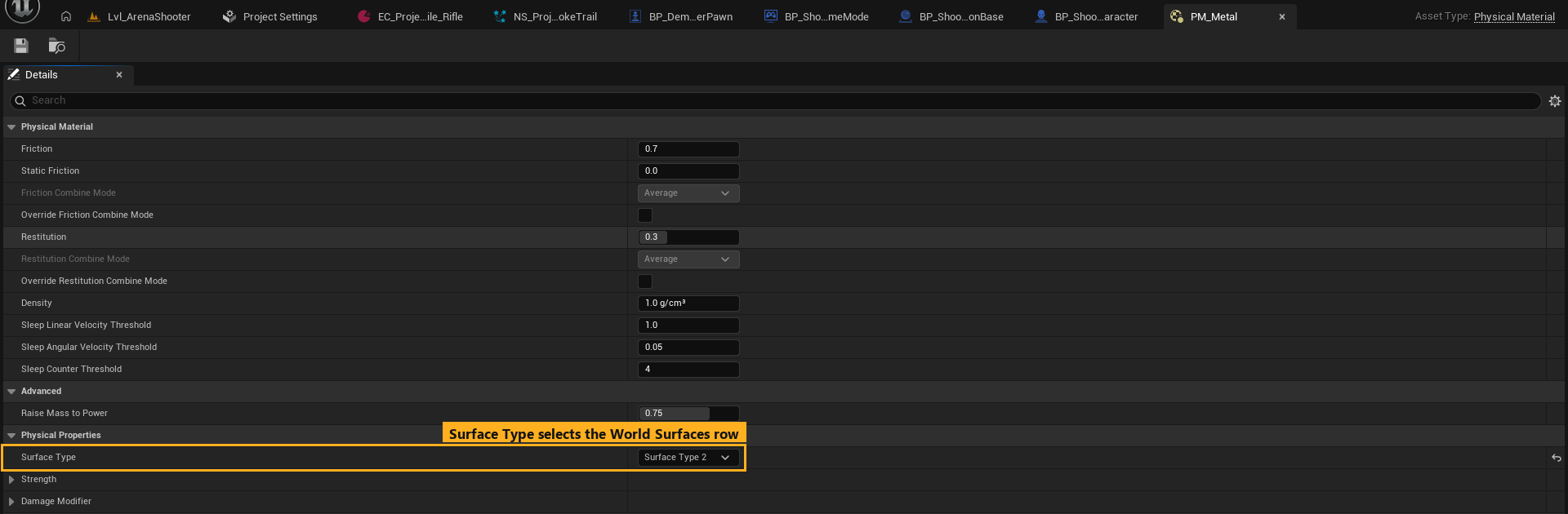
Quick test: assign PM_Metal as the Phys Material Override on a cube in your level, then shoot it at a shallow angle. It ricochets. Swap to PM_Wood and it is penetrated.
2. The World Surfaces table
Project Settings → Plugins → Mass Projectile Subsystem → World Surfaces → Surfaces
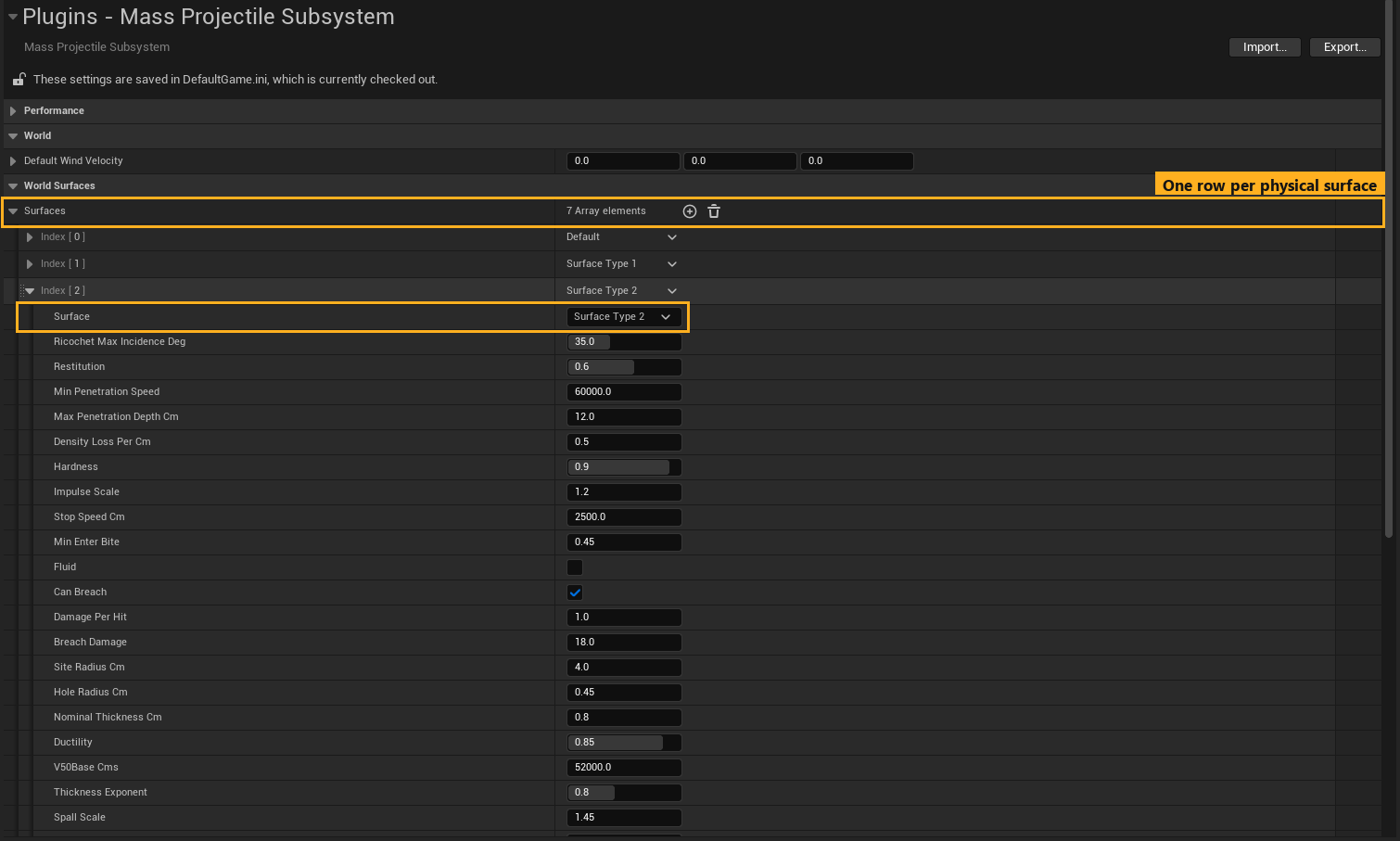
Each row describes a material's ballistic behaviour, for every projectile type. The Default row applies to surfaces without their own row.
How a hit is resolved
- Ricochet check. If the impact angle measured from the surface plane is below Ricochet Max Incidence Deg (scaled by the type's Ricochet Angle Scale, easier on harder surfaces), the round bounces and keeps Restitution of its speed.
- Entry check. Otherwise the round tries to enter. It needs the normal component of its speed to exceed Min Penetration Speed and the surface's V50 ballistic limit for the actual thickness. Heavier, faster, higher-Penetration-Power rounds enter more easily; oblique hits need more speed.
- Inside the material the round loses speed exponentially (Density Loss Per Cm ÷ Penetration Power). If the far face is past the point where it would come to rest (or past Max Penetration Depth Cm), it is buried (Stop). Otherwise it exits (Penetration Exit) and keeps flying under gravity.
- Exit speed is the ballistic-limit residual,
v × √(1 − (V50 ÷ normal speed)²)(surfaces with V50 Base Cms0use the drag loss instead). A round that only just beats V50 leaves almost stopped and drops to the ground; one far above V50 keeps nearly all of its speed. - Spent rounds. A round that neither ricochets nor enters is stopped on the face. On surfaces with Spent Drop Speed Cm above
0(steel by default) it then falls off the face under gravity instead of vanishing.
Fields
Physics
| Field | Meaning |
|---|---|
| Surface | Which surface type this row describes. |
| Ricochet Max Incidence Deg | Hits shallower than this angle (from the surface plane) ricochet. |
| Restitution | Fraction of speed kept after a ricochet. |
| Spent Drop Speed Cm | A round that can neither enter nor ricochet falls off this face instead of vanishing, leaving at up to this speed (cm/s). It still makes its impact, decal and damage; where it lands it is removed quietly. 0 = it stops on the face (embeds). Metal defaults to 250. |
| Min Penetration Speed | Minimum normal-component speed (cm/s) to enter. |
| Max Penetration Depth Cm | Thicker than this, the round cannot pass through. |
| Density Loss Per Cm | Exponential speed loss per cm of material. Sets how deep a round can reach; the exit speed comes from V50 unless V50 Base Cms is 0 (and for fluids). |
| Hardness | 0–1. Harder surfaces ricochet more easily and need more energy to enter. |
| Impulse Scale | Multiplier on physics impulse for simulating bodies with this surface. |
| Stop Speed Cm | In-material speed at or below which a round that has not reached a face is buried. 0 (default) = only when it comes to rest. A face the round can still reach is always an exit, however slow. |
| Min Enter Bite | Minimum "bite" (penetration score vs. hardness) needed to enter. 0 = only Min Penetration Speed gates entry (fluids). |
| Fluid | Water-style volume: rounds enter and travel with heavy drag; grazing hits can still skip. |
Ballistic Limit (V50)
| Field | Meaning |
|---|---|
| Nominal Thickness Cm | Reference plate thickness for V50. The live V50 scales with the actual thickness along the shot: a 5 cm wall hit 30° from its surface reads 10 cm. |
| Ductility | 0 = brittle (concrete, glass), 1 = ductile (mild steel). Controls the hole shape. |
| V50 Base Cms | Normal speed (cm/s) at which a 7.62 mm / 9.5 g round has a 50% chance to perforate the nominal thickness at 90°. |
| Thickness Exponent | How strongly V50 grows with thickness. |
| Spall Scale | Exit hole size relative to entry. |
| Yield Speed Cms | Speed that dents a ductile plate without perforating. 0 = 22% of V50. |
Look
| Field | Meaning |
|---|---|
| Decal Color | Tint of the fallback hole decal on this surface. |
| Decal Size Cm | Hole decal size (types can override it per surface). |
| Ricochet Decal Size / Width Cm | Ricochet scuff size. 0 = derived from Decal Size. |
| Spawn Decals | Off for water and similar surfaces. |
Breaching (Can Breach, Damage Per Hit, Breach Damage, Site Radius Cm, Hole Radius Cm, Breach * Scale): used only by the optional Projectile Holes add-on. They have no effect without it, so leave the defaults.
Shipped values
| Surface | Ricochet ≤ | Min pen. speed | Max depth | Hardness | V50 (nominal) | Notes |
|---|---|---|---|---|---|---|
| Default | 20° | 150 m/s | 80 cm | 0.40 | 350 m/s @ 2 cm | |
| Concrete | 25° | 400 m/s | 40 cm | 0.75 | 700 m/s @ 15 cm | |
| Metal | 35° | 600 m/s | 12 cm | 0.90 | 520 m/s @ 0.8 cm | Ricochets readily |
| Wood | 12° | 120 m/s | 120 cm | 0.25 | 220 m/s @ 5 cm | Penetrated easily |
| Dirt | 8° | 100 m/s | 100 cm | 0.35 | 380 m/s @ 25 cm | |
| Glass | 4° | 40 m/s | 20 cm | 0.12 | 80 m/s @ 0.8 cm | |
| Water | 8° | — | 800 cm | 0.08 | — | Fluid, no decals |
Using your own surfaces
If your project already uses surface slots 1–6 for other things, or you want more materials:
- Create (or reuse) your physical materials and their Surface Type entries in Project Settings → Physics → Physical Surface.
- In World Surfaces → Surfaces, change each row's Surface dropdown to your surface, or add rows (+) for new ones.
- In each projectile type's Surface FX → Responses, point the rows at the same surfaces so decals and sounds match.
- Use your physical materials on your meshes. The shipped
PM_*assets become optional.
Water is special-cased by the Niagara impact system: hits on SurfaceType6 draw a splash instead of dust and sparks. If you move water to another slot, splashes fall back to the solid-surface burst.