Tutorial — Fire from Blueprint
Goal: a pawn that fires automatic Mass projectiles from the camera while the fire button is held, and cycles projectile types with a key.
Time: 15 minutes. Result: the same logic as the shipped BP_DemoShooterPawn (open it to compare).
This tutorial uses the direct Spawn Projectiles call, which is ideal for single-player, AI turrets, and scripted volleys. For a player weapon in a multiplayer game, use the Mass Projectile Fire component instead (Tutorial 8). It adds client prediction and a validated server RPC.
The two nodes that matter
| Node | Category | What it does |
|---|---|---|
| Make Projectile Fire Event | Utilities › Struct | Packs one volley: Origin, Direction, Count, Speed (0 = type default), Spread Half Angle Deg, Random Seed (0 = automatic). |
| Spawn Projectiles | Mass Projectiles | Spawns the volley. Needs a Target (Get Projectile Subsystem), a Type Config (an EC_Projectile_* asset) and the fire event. Returns how many projectiles were actually spawned. |
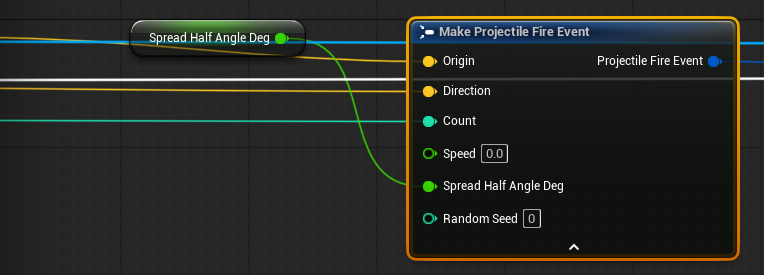
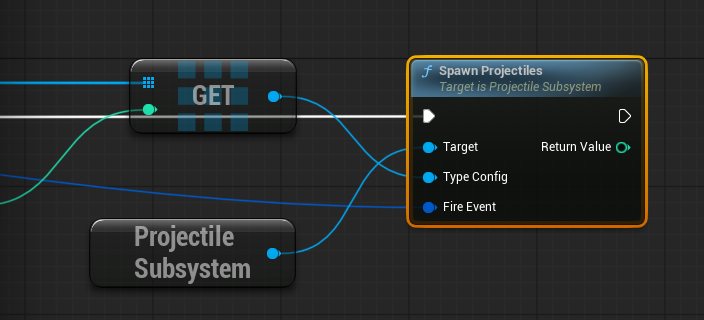
Fire Projectiles (Mass Projectiles category) is the same call with a world context instead of a subsystem target. Use whichever reads better.
Step 1 — Variables
Create a Pawn (or Character) Blueprint and add:
| Variable | Type | Default | Notes |
|---|---|---|---|
ProjectileTypes |
Mass Entity Config Asset (Object Reference) array | Rifle, Shell, Plasma | Instance Editable |
TypeIndex |
Integer | 0 | Which entry fires |
RoundsPerMinute |
Float | 900 | |
SpreadHalfAngleDeg |
Float | 0.6 | Random cone per round |
MuzzleOffsetCm |
Float | 100 | Spawn in front of the camera so rounds do not hit your own collision |
bTriggerHeld |
Boolean | false | |
FireAccumulator |
Float | 0 | Fractional rounds carried between frames |
Step 2 — FireRounds (function)
Create a function FireRounds with an Integer input Rounds:
- Branch on
Rounds > 0; return on False. - Get Actor Eyes View Point (self) → Out Location, Out Rotation.
- Get Forward Vector (Out Rotation) →
Direction. Origin = Out Location + Direction × MuzzleOffsetCm.- Make Projectile Fire Event: Origin, Direction, Count =
Rounds, Spread Half Angle Deg =SpreadHalfAngleDeg. Leave Speed at 0 and Random Seed at 0. - Get Projectile Subsystem → Spawn Projectiles with Type Config =
ProjectileTypes[TypeIndex](array Get) and the fire event.
Roundsgoes into Count, so a frame that owes three rounds fires them in one call. Batching like this is what keeps 20,000-round volleys cheap.
Step 3 — Automatic fire with an accumulator
Firing from a timer drifts at high RPM. Accumulate time on Event Tick instead:
- Input: Fire Pressed → set
bTriggerHeld = true,FireAccumulator = 1.0(the first round fires immediately). - Input: Fire Released → set
bTriggerHeld = false. - Event Tick → Branch
bTriggerHeld:FireAccumulator += DeltaSeconds × RoundsPerMinute / 60Rounds = Floor(FireAccumulator), thenFireAccumulator -= Rounds- FireRounds(
Rounds)
The Mass Projectile Fire component implements this for you (Reset Fire Accumulator, Consume Fire Rounds); see Tutorial 8.
Step 4 — Cycle types and clear
- Input: Next Type →
TypeIndex = (TypeIndex + 1) % Length(ProjectileTypes). - Input: Clear → Clear Projectiles (Mass Projectiles category). On a server this also clears every client.
Step 5 — Test
Place the pawn (or set it as Default Pawn Class in your Game Mode) and press Play. Hold fire: tracers stream from the camera. If you see nothing, check Troubleshooting.
Variations
Shotgun: set Count to the pellet count (for example 9) and Spread Half Angle Deg to 4. All pellets come from one fire event.
Muzzle socket: replace step 2 with the weapon mesh's Get Socket Location / Get Socket Rotation (Muzzle). Keep the camera direction if you want shots to converge on the crosshair.
Custom speed per shot: set Speed (cm/s) on the fire event, for example for a charge-up weapon. 0 uses the type's Default Speed.
Fountain / stress test: StressVolley in the demo pawn fires StressCount rounds in a single call. The console equivalent is proj.SpawnStress 20000.
Networking note
On a server or standalone machine, Spawn Projectiles automatically replicates the shot to all clients (if the type is listed in Replicated Types). On a client, it spawns locally only and nobody else sees it. For player-controlled weapons in multiplayer, go to Tutorial 8 and Tutorial 10.