Tutorial — Hits and Damage
Goal: every projectile that hits an actor calls Apply Damage with the type's Base Damage, once per wall or body it enters, server-authoritative.
Time: 10 minutes.
How hits reach Blueprint
Projectiles have no actors, so there is no OnHit on a bullet. The subsystem raises one On Projectile Hit event per impact instead, on the authority only (standalone, listen server, dedicated server). Clients never receive it, so health cannot be changed client-side.
Two ways to listen:
| Option | Use when |
|---|---|
| Mass Projectile Hit component on the Game Mode (or Game State) | You want one place that applies damage for every hit. Recommended. |
| Mass Projectile Hit component on a pawn with Owner Hits Only | Each actor handles its own hits (for example, a destructible prop). |
| Get Projectile Subsystem → Bind Event to On Projectile Hit Event | You prefer binding manually (for example, from a subsystem-like manager Blueprint). |
Step 1 — Add the component to the Game Mode
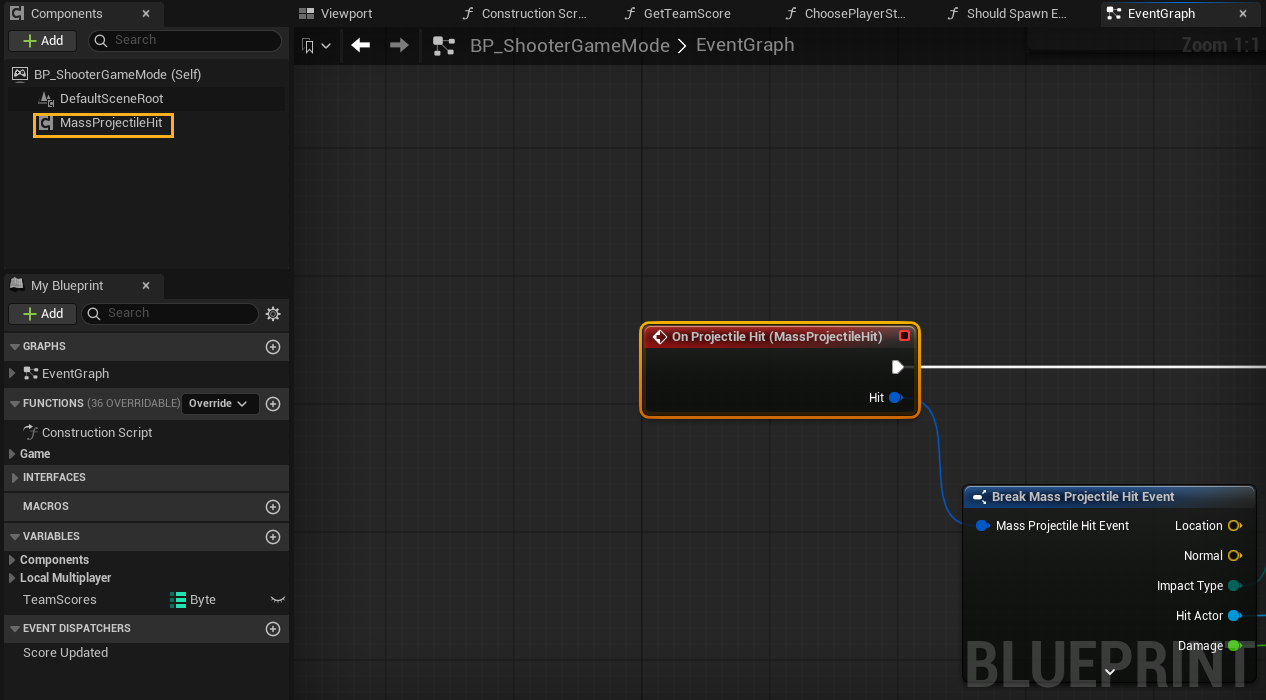
Open your Game Mode Blueprint → Components → Add → Mass Projectile Hit. Leave Owner Hits Only unticked.
Select the component, and in its Details panel under Events, click + next to On Projectile Hit.
Step 2 — Filter and apply damage
- From Hit, drag out Break Mass Projectile Hit Event.
- Is Gameplay Damage Impact (Impact Type) → Branch.
- On True → Apply Damage:
- Damaged Actor = Hit Actor
- Base Damage = Damage
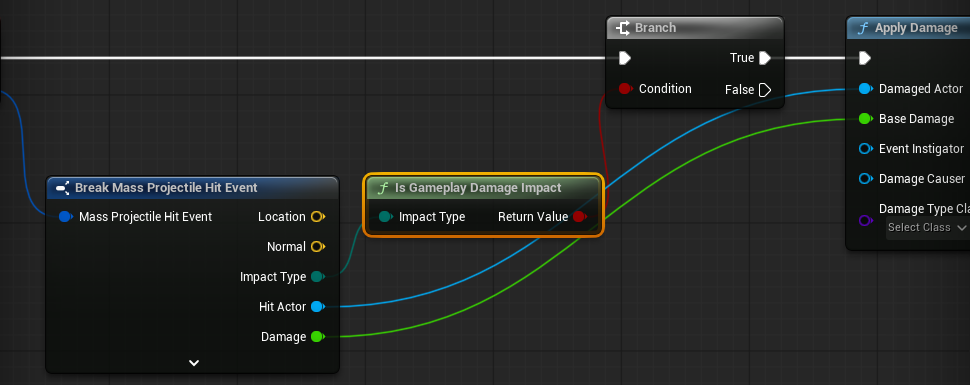
Done. Any actor with an Event AnyDamage (or Take Damage override in C++) now takes projectile damage.
Why filter with Is Gameplay Damage Impact?
One round through a plank produces Penetration Enter and then Penetration Exit, and a glancing round produces Ricochet. Is Gameplay Damage Impact is true only for Stop and Penetration Enter, so every body the round enters is damaged exactly once. Grazes and exit holes are ignored.
To make ricochets hurt a little, add a second branch: Impact Type == Ricochet → Apply Damage with Damage × 0.3.
Step 3 — Give the round an instigator (optional)
Apply Damage accepts Event Instigator and Damage Causer. The hit event does not carry the shooter, because projectiles are anonymous for performance. Common approaches:
- Per-team or per-weapon types: give each faction its own type asset, then map Type Config → team in the hit handler.
- Self-damage checks: put the component on the pawn with Owner Hits Only and compare against your own logic.
Hit event fields
| Field | Type | Meaning |
|---|---|---|
| Location | Vector | Impact point |
| Normal | Vector | Surface normal |
| Velocity | Vector | Incoming velocity (cm/s). Use its size for speed-based damage falloff. |
| Impact Type | Enum | Stop, Ricochet, Penetration Enter, Penetration Exit |
| Surface | Physical Surface | Surface type that was hit |
| Hit Actor | Actor | The actor that was hit (may be None for BSP/landscape) |
| Hit Component | Primitive Component | The component that was hit |
| Hit Item | Integer | Instance index for instanced static meshes, else -1 |
| Entry Location | Vector | Entry face for buried/exit hits (equals Location otherwise) |
| Damage | Float | The type's Base Damage |
| Damage Units | Float | Surface-breach units (Projectile Holes add-on only; 0 otherwise). Not HP damage. |
| Impulse | Vector | Physics impulse already applied by the subsystem |
| Type Index | Integer | Runtime type index |
| Type Config | Mass Entity Config Asset | The projectile type. Use it to branch per ammo. |
Recipes
Headshots: the hit event carries no bone name. For per-bone damage, run a short Line Trace By Channel from Location − Velocity.Normal × 5 to Location + Velocity.Normal × 5 against the Hit Component and read Hit Bone Name, or compare Location.Z with the actor's head height.
Damage falloff with speed: Damage × Clamp(VectorLength(Velocity) / 80000, 0.2, 1).
Surface-specific effects in gameplay (for example, igniting wood): branch on Surface.
Physics impulses
Simulating physics bodies are pushed automatically. The server pushes every body. A client also pushes bodies whose movement the server does not replicate (for example level props with Simulate Physics on), because it simulates those itself; bodies with Replicate Movement follow the server. Tune with the type's Impulse Scale, Impact Radial and Flyby Impulse fields, and globally with proj.ProximityImpulse 0/1. Use proj.DrawImpulse 1 to visualise.